


LiveHealth Online Mobile
3.73.80K Reviews
App Specs
- Version
- 20.05.0100
- Updated On
- License
- Free
- Downloads
- 500,000+
- Developer
- American Well Corporation
- Categories
- Medical
- Platform
- Android, iOS
Screenshots
 Analysis by AppCompare
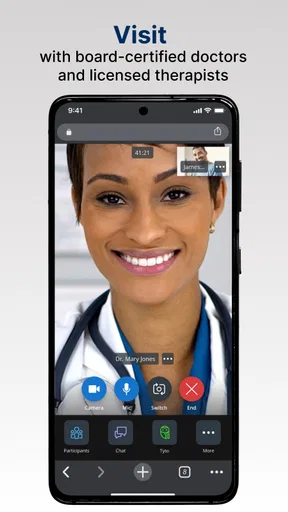
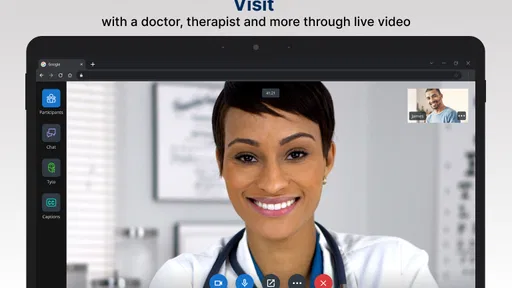
When I look at a medical app, I care less about a polished promise and more about what happens when I need help, what information I must share, and how much control I keep throughout the process. LiveHealth Online Mobile is built around a straightforward purpose: connecting a mobile user with a live doctor. I found that focus useful because it avoids turning the phone into a cluttered health portal. The app is free, aimed at everyone, and developed by American Well Corporation, so its appeal is easy to understand for people who want a remote consultation option without beginning with a trip to a clinic.
My overall impression is cautiously positive. LiveHealth Online Mobile is most useful as a convenient access point for non-emergency medical conversations, especially when travel, waiting rooms, or a busy schedule make an ordinary appointment difficult. At the same time, I would not treat it as a replacement for urgent care, an established doctor-patient relationship, or a full medical examination. The value depends on whether a live online consultation fits the situation and whether you are comfortable handling personal health information through a mobile service.
What the app is really for
The app belongs to the medical category, but its role is narrower than a general health tracker. It is not primarily about counting steps, recording symptoms for months, or organizing every part of your medical history. Its central experience is the connection with a live doctor. That makes the app easier to understand than many health platforms, although it also means you should approach it with a specific reason for seeking advice rather than expecting a complete medical system in your pocket.
I can imagine using it on a weekday when a minor but uncomfortable problem appears and my usual schedule makes an in-person visit awkward. For example, if I developed a routine health concern while away from home, I would first decide whether it was suitable for an online conversation. If it seemed appropriate, the app could save the time involved in commuting and sitting in a waiting room. I would still keep my expectations realistic: a doctor speaking with me through a phone cannot examine every physical sign or perform tests directly through the screen.
That distinction is important. The app should not be the first choice for severe symptoms, rapidly worsening conditions, or anything that feels like an emergency. In those situations, I would use local emergency services or immediate in-person care instead. For a complex issue requiring examination, imaging, laboratory work, or access to a detailed long-term record, a traditional appointment may be the better route. LiveHealth Online Mobile makes remote contact easier; it does not remove the boundaries of remote medicine.
The service has been available since October 9, 2013, which gives it a longer presence than many newer mobile health products. Its current version is 20.05.0100, and it requires Android 8.0 or later. Those details matter if you are using an older phone, because a useful service is no help if your device cannot run the current app. On compatible hardware, the free price lowers the barrier to trying it, though a free download should not be confused with a guarantee that every medical interaction or follow-up circumstance will be cost-free.
Trust starts with a clear reason to open the app
In my experience, the most reassuring part of the product concept is that it does not pretend to be more than it is. The store summary presents it as a way to connect with a live doctor, and that is the standard I use when judging it. I would trust it more for a focused consultation than for vague self-diagnosis. The more clearly I can explain why I need medical guidance, the more useful a remote conversation is likely to be.
Worth Reading Before You Choose

EA SPORTS FC Mobile 26 Is a Bigger Football Game, but It Takes Time

Flipboard Shows What News Apps Must Do Beyond the Feed

Switching to Android Auto Means Rethinking Your Driving Routine

Google Calendar Makes a Crowded Week Easier to Manage

Ludo King Makes the Most of the Minutes Between Plans

Baby Panda World Brings Quick Play to Modern Phones, but Its Game Library Feels Busy
The public response is mixed but substantial. LiveHealth Online Mobile has an average rating of 3.7 from around 6,900 ratings, alongside roughly 3,800 written reviews and over 500,000 installs. I read those figures as evidence of meaningful use rather than proof that every patient will have a smooth experience. A rating in that range suggests that convenience is balanced by real-world friction for some people. It is worth checking the app on your own phone and considering your likely consultation needs instead of assuming the rating tells the whole story.
The developer is American Well Corporation, a name directly associated with the product rather than an anonymous publisher. That gives the app a recognizable point of accountability, but it does not mean I would skip the ordinary privacy checks. Medical information is sensitive regardless of who operates the service. Before creating an account or starting a consultation, I would read the visible privacy and consent screens carefully, note what choices are presented, and avoid sharing unrelated personal details in a conversation.
Account choices deserve attention before the first consultation
A common mistake with health apps is to rush through setup because the user is worried or uncomfortable. I would slow down with this one. The important question is not only whether I can reach a doctor, but also which account details are required, how identity is confirmed, and what information is shown before I agree to proceed. I would use a strong, unique password if the app requires one, keep my phone protected, and avoid starting a consultation on a shared device where another person could see sensitive screens or notifications.
I would also prepare a short description of the issue before opening the app. This is a practical privacy measure as well as a communication tip. A concise account of when the problem began, what changed, and what I have already tried reduces the temptation to type a long, unfocused history into every available field. It helps me share what is relevant without oversharing information that has no bearing on the consultation.
The app’s Everyone content rating makes it broadly approachable, but that label describes suitability of the app’s content, not the seriousness of the medical topics a user may discuss. A parent, older adult, or caregiver may still need to think carefully about who owns the account, who can access the phone, and whether the person receiving care can communicate independently. I would not assume that a general age classification answers those practical questions.
Where personal information becomes especially sensitive
The most data-sensitive moment is obvious: the consultation itself. Speaking with a doctor through a mobile device can involve symptoms, medications, previous conditions, and identifying details. I would make the call in a private place, use a secure connection rather than an unknown public network, and check that no one nearby can overhear. These steps are simple, but they matter more than cosmetic app settings when the conversation concerns intimate health information.
The second sensitive moment is the transition before and after the consultation. Any form, message, appointment detail, or account screen may reveal more than I want visible on a lock screen. I would review notification behavior on my phone and be careful when taking screenshots. If I used a family tablet or a work phone, I would consider whether the device is shared, backed up automatically, or accessible to other people. Those are user-side decisions, but they strongly affect real privacy.
I would also avoid treating the consultation as a place to experiment with unnecessary details. If a doctor needs more background, I can provide it when asked. That does not mean hiding relevant medical information; it means keeping the conversation focused and intentional. A remote appointment works best when I am honest about the issue while remaining aware that every extra detail is part of a sensitive record or conversation.
For the same reason, I would not use the app while driving, in a crowded public area, or during a situation where I cannot listen carefully. A consultation is not merely a quick chat. Missing part of the doctor’s guidance could create confusion, and trying to multitask may lead me to disclose information where others can hear it. Choosing the right setting is one of the most meaningful controls I have as a user.
What control I would expect as a user
Good medical software should let me understand what I am agreeing to rather than pushing me through an opaque process. With LiveHealth Online Mobile, I would pay attention to every visible choice during sign-in, consultation entry, and account management. I would look for clear ways to review or update my profile, manage access, and leave the service if it no longer suits me. If a screen presents a consent request, I would read its wording instead of tapping through automatically.
I would also keep my own practical record of the consultation. That might mean noting the date, the main advice, and any follow-up action in a private place. I would not rely on memory alone, particularly if I am tired or worried. This habit gives me more agency because I can compare later advice with what was discussed and explain the situation accurately to my regular doctor if an in-person visit becomes necessary.
Another useful habit is deciding in advance what outcome I need. Am I looking for guidance about whether I should seek in-person care? Do I need to discuss a routine concern? Do I need help understanding the next step? A clear goal makes it easier to recognize when the app has served its purpose. It also prevents me from continuing to use a remote consultation when the issue has become too complicated for that format.
For families, control can be less straightforward. I would not casually share one login among several people, because personal health conversations should remain separated whenever possible. I would also confirm whose information is being entered before starting a session. If a caregiver is helping someone else, I would make sure the person receiving care understands the conversation and agrees to the assistance. The app may be convenient, but convenience should not erase the patient’s voice.
How it compares with ordinary alternatives
Compared with calling a clinic, the main advantage is the possibility of reaching a live doctor through a mobile device instead of beginning with a phone queue or a physical waiting room. That can be valuable when the issue is suitable for remote care and time is limited. A clinic, however, may provide continuity with a doctor who already knows the patient’s history, while an online consultation may feel more separate from ongoing care.
Compared with searching symptoms on the web, this app offers a human conversation rather than a list of possible conditions. I consider that a major practical difference. Search results can be useful for learning basic vocabulary, but they can also increase anxiety and encourage self-diagnosis. A live doctor can ask follow-up questions and place the concern in context. The trade-off is that the app requires a real consultation and still cannot provide every kind of examination.
Compared with a symptom checker, LiveHealth Online Mobile is better suited to someone who wants professional interaction rather than an automated suggestion. A checker may be faster for general orientation, but it cannot replace a clinician’s conversation. On the other hand, if I already know that I need a physical test, a prescription decision tied to an examination, or urgent treatment, I would choose an appropriate in-person service instead of forcing the problem into a mobile appointment.
Compared with a hospital emergency department, the app is the wrong tool for emergencies. The difference is not about convenience; it is about capability and speed of treatment. I would never let the availability of an online doctor delay urgent help. This is the clearest boundary around the product and one every new user should understand before relying on it.
Small workflow decisions that make it more useful
My first practical tip is to test the basics before I am ill. I would check that the app installs on my phone, that I can sign in, and that I understand the opening screens while I am calm. Discovering an account or device problem during a stressful health situation is avoidable friction. This is especially relevant because the app requires Android 8.0 or newer; an older device may need another plan.
My second tip is to prepare a compact consultation note. I would write down the symptom, its starting point, changes over time, current medicines, allergies, and the question I want answered. I would keep the note private and show only what is relevant. This improves the conversation without turning the app into a permanent diary of every health thought I have.
My third tip is to plan the handoff to regular care. If the doctor recommends an in-person appointment, I would act on that advice rather than repeatedly reopening the online service. If I already have a primary-care provider, I would be ready to explain what happened during the remote visit. The app works best as one part of a care decision, not as a wall between me and every other medical resource.
My fourth tip concerns device boundaries. I would use headphones only if they do not prevent me from hearing clearly, keep the phone charged, and choose a quiet private room. I would also close unrelated apps and avoid displaying personal messages during the consultation. These steps are not special medical features, but they make the actual interaction more focused and reduce accidental exposure of other information.
Who should choose it, and who should skip it
I would recommend trying LiveHealth Online Mobile to someone who wants a direct remote-doctor option, has a compatible Android phone, and can identify a non-emergency concern that is reasonable to discuss online. It may suit a busy adult, a person temporarily away from home, or anyone who finds a mobile consultation more manageable than arranging an immediate clinic visit. The free download also makes it easier to evaluate the experience without committing to a purchase at installation.
I would be more cautious for someone who needs continuous care from one familiar clinician, has a complicated medical history that is difficult to summarize, or expects every concern to be resolved remotely. I would also steer away from it for emergencies, severe symptoms, or problems likely to require a physical examination or testing. In those cases, a clinic, urgent-care service, or emergency department is more appropriate.
People who are highly uncomfortable discussing health information through a phone should think about that trade-off before signing up. The app’s entire value depends on a remote conversation, so privacy at home, device security, and comfort with digital accounts are part of the experience. If those conditions are not available, a normal appointment may feel safer and more practical.
My cautious verdict after weighing convenience and control
LiveHealth Online Mobile earns a place as a focused telehealth option, not as an all-purpose medical replacement. I like the direct purpose and the possibility of speaking with a live doctor without immediately traveling to a clinic. Its established presence, broad Everyone rating, free availability, and sizable user base make it reasonable to consider, while the 3.7 average rating reminds me to keep expectations measured rather than assuming a flawless experience.
The app is at its best when I use it deliberately: I choose a suitable non-emergency problem, prepare the relevant information, protect my privacy, and remain willing to seek in-person care if the situation demands it. It is less convincing when treated as a shortcut around examination, testing, continuity, or urgent treatment. Those limits are not minor details; they define whether the service is appropriate.
If I were recommending it to a friend, I would say this: install it only after deciding what kind of medical help you want and checking that your phone meets the Android requirement. Read each visible account and consent choice, use a private setting, and keep control of what you share. For the right everyday situation, this app can make reaching a doctor feel simpler. For anything urgent, complex, or examination-dependent, I would choose a more direct medical alternative.
In short, LiveHealth Online Mobile is worth considering for convenient live medical contact, provided you treat convenience as one part of responsible care. Its strongest feature is the connection itself; its most important limitation is everything a mobile conversation cannot do. That balance makes it a useful option for some users, but not a universal answer for every health concern.
Pros
- Video visits are available from home
- reducing travel and waiting-room time.
- Supports consultations with board-certified providers for common health concerns.
- Appointment scheduling and on-demand care options offer useful flexibility.
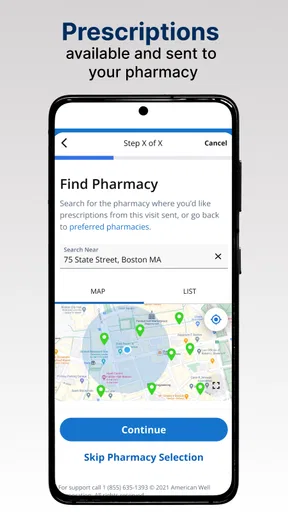
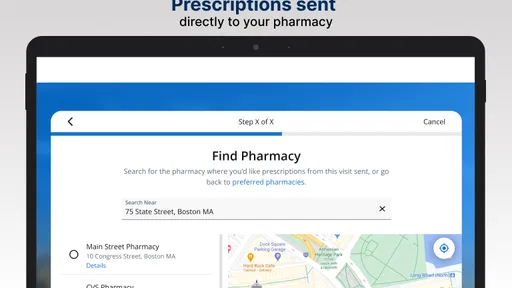
- Digital prescriptions can be sent to a nearby pharmacy when clinically appropriate.
- The interface is generally straightforward for booking and starting a visit.
Cons
- Availability and services can vary significantly by state and insurance plan.
- A reliable internet connection and compatible device are required for video visits.
- Not suitable for emergencies
- severe symptoms
- or conditions needing physical exams.
- Some visits may result in extra fees depending on coverage and provider type.
- Technical issues with camera
- audio
- or login can interrupt a consultation.
FAQs for LiveHealth Online Mobile
What is LiveHealth Online Mobile and what can I use it for?
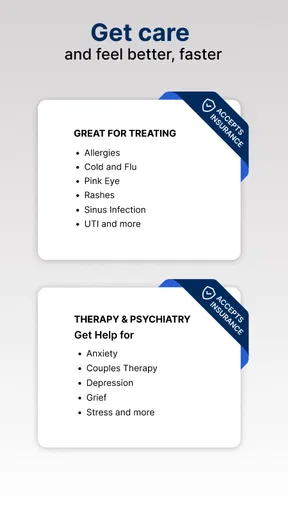
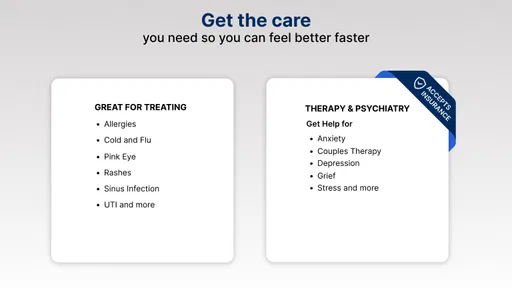
LiveHealth Online Mobile is a telehealth app that lets you connect with participating healthcare professionals through your smartphone or tablet. Depending on your plan, location, and provider availability, you may use it for virtual consultations about common, non-emergency concerns such as colds, allergies, minor infections, skin issues, and general health questions. It is not intended to replace emergency medical care or every in-person appointment.
Do I need health insurance to use LiveHealth Online Mobile?
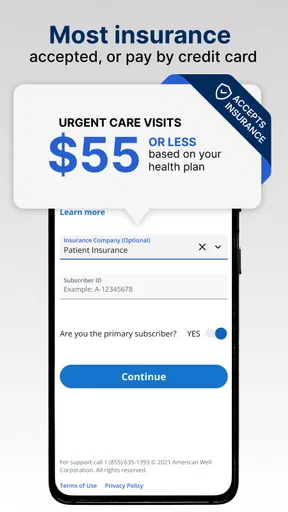
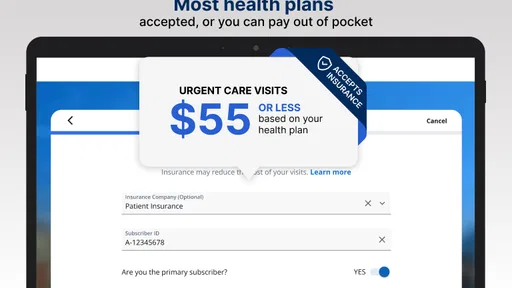
Insurance requirements and consultation costs depend on your employer, health plan, state, and the specific service you choose. Some users may have coverage through an eligible insurance plan, while others can pay a self-pay fee when that option is available. Before starting a visit, review the displayed price, copay, deductible information, and any applicable coverage details so you understand the potential cost.
How do I start a virtual visit in the app?
After downloading LiveHealth Online Mobile, you generally need to create an account or sign in, provide requested personal and health information, and confirm your insurance or payment details. You can then select an available clinician and describe your symptoms before joining the video visit. A stable internet connection, working camera, microphone, and a private, well-lit location will help the appointment run smoothly.
Can LiveHealth Online Mobile prescribe medication or provide specialist care?
A clinician may prescribe medication when medically appropriate and legally permitted, but prescriptions are never guaranteed. Certain medicines, including some controlled substances, may not be available through a virtual consultation. The app may also offer behavioral health or other specialized services depending on your region and plan. Providers can recommend an in-person appointment or emergency evaluation when your condition requires examination, testing, or more advanced treatment.
Is LiveHealth Online Mobile suitable for emergencies or serious symptoms?
No. LiveHealth Online Mobile should not be used for life-threatening situations or symptoms requiring immediate attention. If you experience chest pain, severe breathing difficulty, signs of a stroke, uncontrolled bleeding, loss of consciousness, or another emergency, call your local emergency number or go to the nearest emergency department. For less urgent concerns, the app can help you speak with a clinician, but availability and medical suitability vary.


